

本指南介绍如何编译 SourceMod 插件。
SourceMod 插件是为增强和修改基于 Source 引擎的游戏服务器功能而编写的自定义脚本或附加组件。
SourceMod 插件源代码所使用的编程语言是 SourcePawn。SourcePawn 的文件扩展名为 sp。
编译 SourceMod 插件相当简单,下面将进行说明。
下载 SourceMod
请参考以下指南了解如何下载并解压 SourceMod。编译插件时,你不需要把 SourceMod 安装到服务器上。
https://moddingcommunity.com/blog/how-to-install-update-sourcemod-metamod/
解压 SourceMod 文件后,进入 Linux 上的 addons/sourcemod/scripting 目录(或 Windows 上的 addons\sourcemod\scripting 文件夹)。
编译 SourceMod 插件
编译 SourceMod 插件通常相当简单,在 Windows 上尤其如此。
Windows
Windows 文件资源管理器
如果你想快速编译插件,可以把插件的源代码文件拖放到 scripting 文件夹中的 compile.exe 可执行文件上。此时会打开一个命令提示符窗口,你可以看到编译输出。如果编译成功,你会在 compiled 文件夹中看到编译好的插件。编译后的 SourceMod 插件通常使用 smx 文件扩展名。
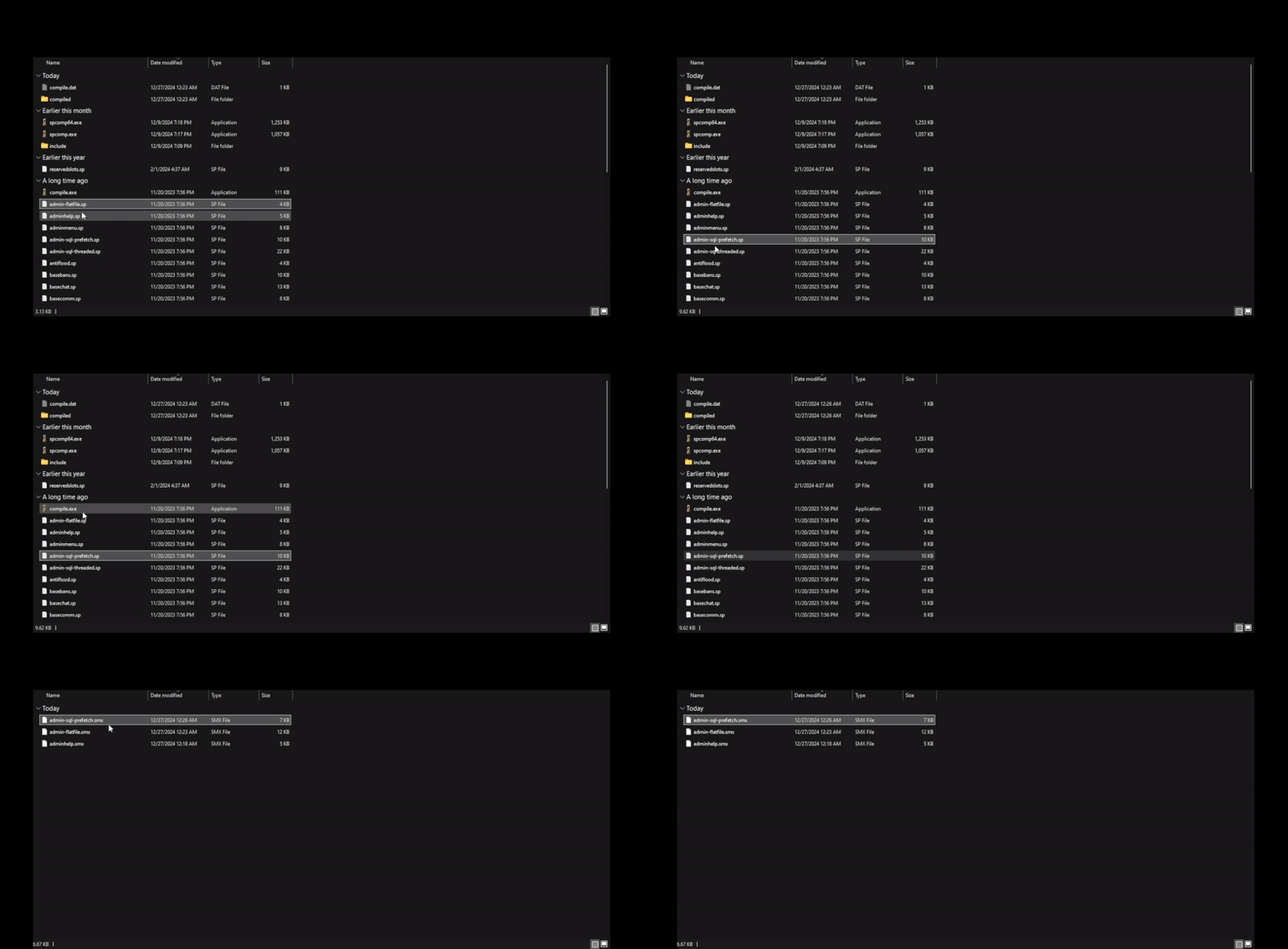
虽然这种方法快捷方便,但下面介绍的命令行方法可以设置更多选项。
命令行
如果你想通过命令提示符或 PowerShell 使用命令行编译插件,首先需要启动一个终端并切换到 scripting 文件夹。
接下来,你需要使用 spcomp.exe 或 spcomp64.exe(用于 64 位支持)可执行文件来编译插件。
下面是一条编译插件的基本命令。
.\spcomp.exe <Plugin File Name With Extension>
例如,如果我们想编译自带的 basechat 插件,就使用以下命令。
.\spcomp.exe basechat.sp
Linux
要通过 Linux 终端编译 SourceMod 插件,可以使用与上文 Windows 命令行方法类似的流程。你需要使用 spcomp 或 spcomp64(用于 64 位支持)可执行文件来编译插件。
下面是一条编译插件的基本命令。
./spcomp <Plugin File Name With Extension>
例如,如果我们想编译自带的 basechat 插件,就使用以下命令。
./spcomp basechat.sp
如果编译成功,你会在与源代码相同的目录(scripting/)中看到新编译出的插件文件。
其他命令行选项
如上所述,通过命令行编译插件可以设置额外的选项。下面是帮助菜单的输出,列出了你可以设置的标志和参数。
SourcePawn Compiler 1.11.0.6969
Copyright (c) 1997-2006 ITB CompuPhase
Copyright (c) 2004-2021 AlliedModders LLC

Usage: ./spcomp [options] <filename> [filename...]

optional arguments:
  --show-stats              Show compiler statistics on exit.
  -D                        Active directory path
  --active-dir=ACTIVE_DIR
  -e                        Error file path
  --error-file=ERROR_FILE
  -E, --warnings-as-errors  Treat warnings as errors
  -h, --show-includes       Show included file paths
  -z
  --compress-level=COMPRESS_LEVEL
                            Compression level, default 9 (0=none, 1=worst,
                            9=best)
  -t, --tabsize=TABSIZE     TAB indent size (in character positions,
                            default=8)
  -v, --verbose=VERBOSE     Verbosity level; 0=quiet, 1=normal, 2=verbose
  -p, --prefix=PREFIX       Set name of "prefix" file
  -o, --output=OUTPUT       Set base name of (P-code) output file
  -O, --opt-level=OPT_LEVEL
                            Deprecated; has no effect
  -i, --include=INCLUDE     Path for include files
  -w, --warning=WARNING     Disable a specific warning by its number.
  -;, --require-semicolons  Require a semicolon to end each statement.
  --syntax-only             Perform a dry-run (No file output) on the input
  --use-stderr              Use stderr instead of stdout for error messages.
  --no-verify               Disable opcode verification (for debugging).
  sym=val                   Define constant "sym" with value "val".
  sym=                      Define constant "sym" with value 0.
例如在 Linux 上,如果希望成功编译的 basechat 插件输出到 compiled/ 目录中,我们可以使用以下命令。
# Make sure compiled directory is made.
mkdir -p compiled

# Output: compiled/basechat.smx
./spcomp -o compiled/basechat basechat.sp
Include 文件
许多已发布的 SourceMod 插件都包含扩展名为 inc 的 include 文件。这些文件需要放入 include/ 目录/文件夹中,否则插件很可能无法编译。
此外,通过命令行编译时,你可以使用 -i 标志来引入默认 include 目录和文件夹之外的其他目录和文件夹。
结语
就是这样!现在你应该已经掌握了编译 SourceMod 插件的所有方法。
如果你对本指南有任何疑问或反馈,请在论坛主题这里回复!本指南今后会持续完善和改进。
欢迎加入我们的 Discord 服务器!