Zee's Gamespice Weapons
A simple weapons pack for some smaller Godot games I'm making for TMC's gaming platform.
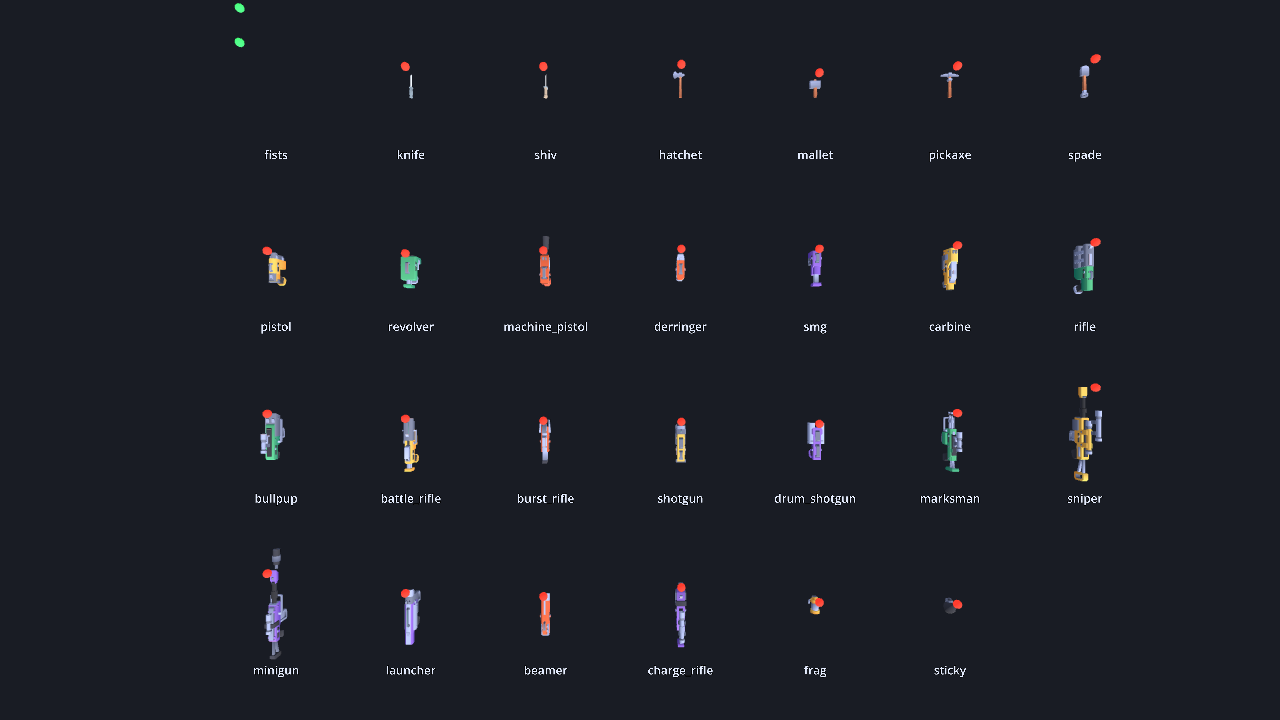
Twenty-seven ready-made weapons for dot-weapon (blasters, melee weapons, grenades and fists), with everything a player sees and hears: first-person view models with arms, third-person world models, animation, tracers, sounds and recoil. Games in the Gamespice collection, such as game-fatal-contact, use it.
The pack has its own headless test suite, but little of it has been in front of real players. Please report anything you run into.
| Slot | Weapons |
|---|---|
| 1 Melee | Fists, Knife, Shiv, Hatchet, Mallet, Pickaxe, Spade |
| 2 Sidearm | Dart Pistol, Revolver, Machine Pistol, Derringer |
| 3 Primary | SMG, Carbine, Assault Rifle, Bullpup, Battle Rifle, Burst Rifle, Shotgun, Drum Shotgun, Marksman Rifle |
| 4 Heavy | Sniper Rifle, Minigun, Launcher, Beamer, Charge Rifle |
| 5 Thrown | Frag Grenade, Sticky Charge |
Every blaster can also bash with the alt-fire button. Weapons differ in how they play, not just in numbers: the knife is the fastest, the mallet hits hardest, the bullpup stays accurate while you move, the beamer rewards keeping aim on a target, and the minigun has no magazine. Seven ammunition types are shared between them.
What it adds to dot-weapon
dot-weapon decides when a weapon fires, reloads and switches, but draws nothing. This pack is the part you see and hear.
| Class | What it does |
|---|---|
ZeeWeaponPack |
The twenty-seven weapons, tuned in ticks. A dedicated server can validate them at boot with no art installed. |
ZeeWeaponArtTable |
The only file that knows a filename. Weapons are named by role, so swapping art means editing this one table. |
ZeeViewModel |
The weapon in your own hands: gloved hands round the grip, sway, bob, recoil, draw and reload animations. aim(held) brings it up to the eye along an iron sight, and reports a zoom for the camera. The sniper, marksman rifle, bullpup and charge rifle use a scope overlay (ZeeScopeOverlay). Aiming is set per weapon in the art table. See docs/view-model.md. |
ZeeWorldModel |
The weapon in somebody else's hands. |
ZeeWeaponPose |
The animation maths, with no nodes, so tests can check it. |
ZeeShotFx |
Tracer, muzzle flash, impact effects and the shot sound. Never built on a server. |
ZeeWeaponSound |
A sound for each kind of weapon, generated on first use. The pack ships no audio files; ZeeWeaponSound.set_stream(id, stream) replaces any of them with a recording. |
ZeeWeaponNet |
Four small replicated fields on top of dot-weapon's, so other players see your gun fire and reload. |
ZeeWeaponRig |
The one node a game adds per player. It sets up everything above. |
Using it
Copy addons/zee_weapons/ and assets/ into your project, next to dot_core, dot_combat and dot_weapon, and enable the plugin.
var rig := ZeeWeaponRig.new()
rig.role = ZeeWeaponRig.Role.LOCAL
rig.authority = true                       # false on a client that only predicts
rig.view_model_ref = DotNodeRef.of_path(view_model.get_path())
player.add_child(rig)
rig.setup()

rig.give(ZeeWeaponIds.RIFLE)
rig.give(ZeeWeaponIds.KNIFE)
Once per simulation tick:
var outcome := rig.simulate_tick(command, tick)

for shot in outcome.shots:
    combat.resolve(shot)                   # dot-combat, on the authority only
Once per rendered frame, for sway, bob and the camera's share of the recoil:
rig.drive_view(Vector2(yaw, pitch), speed, on_floor, crouched)

var punch := rig.view_punch()              # degrees: pitch up, and yaw
fps_view.external_angles = Vector3(punch.x, punch.y, 0.0)
Add the punch to the camera after your controller has positioned it. Do not add it to the command's angles: the shot has already gone where the command pointed.
Tracers, flashes, impacts and sounds come with the rig. Set rig.effects = false if your game draws its own from the used signal. The rig finds the player through DotWeaponPlayerBridge, which names no player or netcode class, so it works with dot-player or your own.
Networking
# On the carrier's replicated object, once:
var specs := ZeeWeaponNet.all_specs()      # dot-weapon's three fields, plus this pack's four

# On the authority, every tick after simulating:
rig.pull_net(replicated)

# On a watcher, every snapshot:
_seen = ZeeWeaponNet.apply(replicated, world_model, _seen)["seq"]
A watcher's world model plays the flash, tracer and sound each time the shot counter moves. It stays quiet if the carrier's first-person rig is on the same machine. Ammunition is sent only to the weapon's owner; that a shot happened is sent to everybody.
Rollback
rig.snapshot() and rig.restore() save and restore the arsenal, the bash cooldown, the charge and the previous command's buttons. Wrap a reconciliation replay in rig.begin_replay() and rig.end_replay() so nothing is drawn twice.
Adding a second weapon pack
Another pack adds its weapons to this one, so every rig, world model and loot table in a game gets them with no change to the game:
ZeeWeaponPack.add_source(&"my_pack", Callable(MyPack, &"weapons"))
ZeeWeaponArtTable.add_source(&"my_pack", Callable(MyPack, &"art"))
ZeeWeaponSound.set_class(&"my_rifle", ZeeWeaponSound.RIFLE)
Pass static methods as above, not lambdas: a lambda kept by zee outlives its script and the game crashes at quit. An id this pack already has stays this pack's (the other is skipped with a warning). remove_source(&"my_pack") takes a pack out. zed-dot-weapons does this.
Requirements
Godot 4.7, plus dot-core, dot-combat and dot-weapon. dot-net, dot-player, dot-player-controller and dot-player-char are used if present. It runs on desktop, mobile and the browser from one build.
Running it
The easiest way to get the pack and its addons is dot-bootstrap (./bootstrap.sh, then cd projects/zee-dot-weapons).
| Command | What it does |
|---|---|
./game.sh |
A firing range you can walk around, holding every weapon |
./game.sh play -- --weapon smg --fire --capture /tmp/smg |
The range firing on its own, saving six frames from the first shot |
./game.sh test |
Check every script and run the test suite |
./game.sh shot --rack |
Every weapon at once, with a marker on each muzzle |
./game.sh help |
All options |
In the range: WASD to move, mouse to look, left click to fire, right click to bash, R to reload, 1 to 5 for slots, Q for the last weapon, the wheel to cycle, F1 to print the rig's state, N to cycle fire modes on guns that declare fire_modes.
Credits
The twelve real-world guns are rebuilt by blender -b --python art-src/guns/build.py (one recipe per gun in guns.py). Parts are cut, reshaped and joined with modelled handguards, barrels, sights and magazines, so no gun is any one source model. Which parts each gun takes is in assets/low-poly-guns/LICENSE.txt. Each kit's licence is next to its files in assets/.
| Asset | Author / source | Licence |
|---|---|---|
| Twelve real-world guns (parts) | Quaternius, Ultimate Low Poly Guns Pack | CC0 1.0 |
| Toy and sci-fi weapons, two gun parts | Kenney, Blaster Kit | CC0 1.0 |
| Melee weapons, ammunition | Kenney, Weapon Pack and Survival Kit | CC0 1.0 |
| Blocky arms (third style) | Kenney, Blocky Characters | CC0 1.0 |
First-person arm (assets/arms/arms-rigged.glb) |
para, fps arms (rigged only), reshaped by art-src/arms/build_arms.py; changes in assets/arms/LICENSE-fps-arms-para.txt |
CC0 1.0 |
| Fire-mode selector clicks | TMC: synthesised in zee_weapon_sound.gd |
MIT |
| Code | TMC | MIT, see LICENSE |
Betrokkenheid in de tijd
Zee's Gamespice Weapons is een Godot-asset. Hij heeft 4 downloads, 61 weergaven en 0 favorieten. Dit item hoort bij 4 tags.
Reviews
Log in om een review achter te laten.
Reacties (0)
Log in om te reageren.