
A 2D Godot game where users move around and eat food (including other players). Inspired by Agar.io. Uses TMC's Dot assets and servers are deployed onto the gaming platform!
This is a game to demonstrate the capabilities of the Dot collection built on-top of Godot 4 and TMC's gaming platform. In this 2D game, players start off as a small monster and grow by consuming food and other players. You may use space to split and throw yourself at others. This is heavily inspired by the cell-eating browser games!
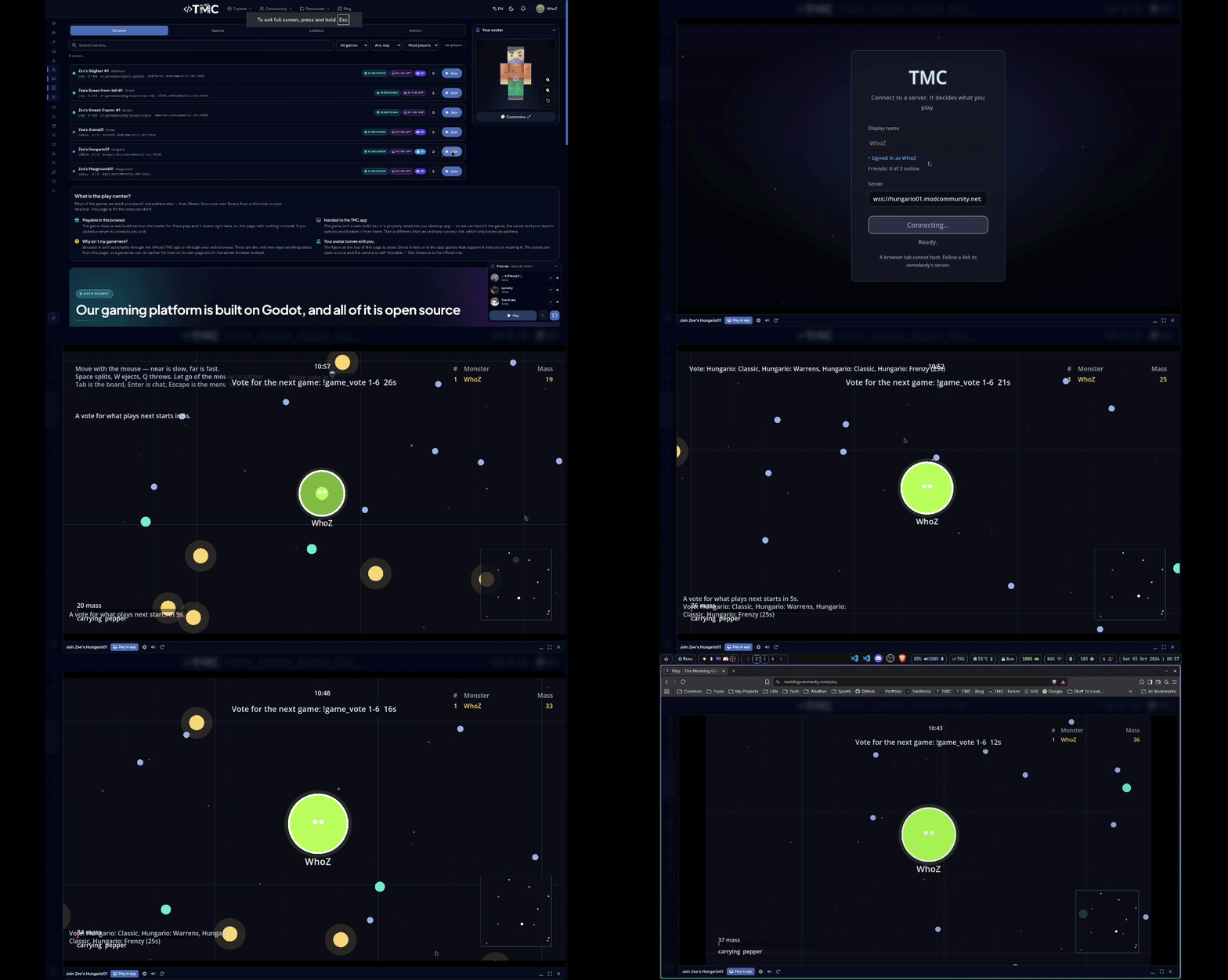
Play on my test server here!
This project and the assets under it are COMPLETELY OPEN SOURCE. You are free to use, modify, and distribute them under the terms of the MIT license. The only thing not open source is the back-end web infrastructure. So if you opt into using your own authentication backend instead of integrating with TMC, you will need to build and integrate your own back-end infrastructure.
From Maintainer & WARNING
This project, along with every asset it is built on, was built initially with Claude Code and will continue to be maintained and extended using it. This is because I (gamemann) cannot build the entire TMC platform alone (I wish I could lol).
Please treat this as partially tested. It has its own headless test suite and that suite passes, but very little of this has been in front of real players yet. Expect rough edges, and please report anything you run into.
I intend on reviewing code, testing, and editing documentation regularly. If you're interested in helping out, please let me know!
How it plays
Your mass is your size, your speed and your score. The bigger you are, the slower you move: twice the mass is about 26% slower. Your avatar rides on top of your monster.
- Eating. You can eat a monster that is at least a quarter smaller than you once you are properly on top of it. Every monster has a ring: green if you can eat it, red if it can eat you.
- Food comes in four sizes. The big pieces are rare, so the fastest way to grow is eating other players.
- Fruit gives you eight seconds of something: rush (faster), maw (eat players closer to your size) or rind (absorbs one burst).
- Throwables are picked up off the ground. A pepper bursts whoever it hits into five pieces, a frostberry slows them, and a lure drops a ring of food where it lands.
- Splitting throws half of you forward to catch someone. Your pieces can't merge for sixteen seconds, so each one is easier to eat.
- Ejecting spits out a little mass to make you smaller and faster.
- Loadout. Before you spawn, pick a starting throwable and a trait: nimble (faster, smaller start), sturdy (bigger start, slower) or greedy (more from food, smaller start).
Mass above 260 slowly decays, so you can't just park in a corner. When you are eaten, you watch whoever ate you until you respawn.
There are six modes:
| Mode | |
|---|---|
| Classic | The standard square arena. |
| Frenzy | Small, fast and over quickly. |
| Gauntlet | A long, narrow corridor. |
| Warrens | A square with rocks and refuges in it. |
| Reef | A wall with four channels through it, tight at one end and open at the other. |
| Shallows | Lines of posts whose gaps narrow the further in you go, so only small monsters reach the middle. |
Controls
| Key | Action |
|---|---|
| Mouse | Steer. The further the cursor, the faster you go. Put it on yourself to pull your pieces back together |
| Space | Split |
| W | Eject mass |
| Q | Throw what you are holding |
| Tab (hold) | The scoreboard: every monster ranked by mass, with their pieces, how long they have been on the server and their ping |
| Y / U | Chat / chat with nearby players |
| H | Help: the goal, the modes and every key as you have it bound |
| Esc | Menu: loadout, settings, controls, help and leave |
On a phone, drag to steer, and there are buttons for split and throw.
Getting started
You need Godot 4.7. The game is built from many Dot addons, each in its own repository, so the easiest way to get everything is dot-bootstrap. It clones every project and links the addons into each one:
git clone https://github.com/modcommunity/dot-bootstrap.git
cd dot-bootstrap
./bootstrap.sh
cd projects/game-hungario
./game.sh
On Windows, run bootstrap.ps1 instead and open the project in Godot.
game.sh does everything else:
| Command | What it does |
|---|---|
./game.sh |
Open the launcher. Pass -- --offline to play against bots |
./game.sh online |
Start a local server (Classic) and the browser client, and print the link to open |
./game.sh online hungry_reef |
The same, in another mode (hungry_frenzy, hungry_gauntlet, hungry_warrens, hungry_reef) |
./game.sh online down |
Stop them |
./game.sh server |
Start a local dedicated server only |
./game.sh test |
Check every script and run every test suite |
./game.sh help |
All of the options |
online and server use dot-server-deploy, which bootstrap clones next to this one. Run its ./setup.sh once first.
Running a server
Settings are cvars. Set them in the server's config, on the command line, or live from the console. cvarlist hungry_ lists them all.
bot_quota 6                   // players the arena is kept at with bots; each person who joins replaces one
bot_quota_mode fill           // fill (as above), fixed (that many bots), per_player (that many per person) or off
bot_difficulty medium         // easy, medium, hard or nightmare: how far bots see, how soon they run, how well they throw
hungry_hunters_on 0           // release NPC hunters into the arena
sv_ragdoll 1                  // an eaten monster goes down (deflates, folds, slams flat, or is thrown); 0 just shrinks it
sv_ragdoll_reactions ""       // weights for limp, crumple, face_plant, headshot_launch (swallowed whole), power_launch; 0 turns one off
hungry_hazards_count 0        // rocks scattered into the arena at load
hungry_outgrown ""            // a monster stuck in a refuge it outgrew: accept, cap or eject (empty: the mode's own)
hungry_avatar_pack ""         // manifest URL for this server's rider content
The bot cvars are the family's shared ones (dot-server's DotBotQuota, and dot-bot's bot_difficulty with the bot_* settings it bundles; offline they are console variables, or -- --bot_difficulty hard at launch). hungry_bots N still works and means what it did, N bots beside everybody: it sets bot_quota N and bot_quota_mode fixed. It is deprecated.
Console commands:
| Command | |
|---|---|
hungry_status |
The world, the food and the network |
hungry_top |
The leaderboard (also works in chat) |
hungry_restart |
Restart the round |
hungry_loadouts |
What everybody brought in |
hungry_hunters [on|off|clear] |
The NPC hunters |
hungry_hazards [scatter <n>|clear] |
Rocks, spikes and lures |
hungry_give <player> <pepper|frost|lure> |
Give somebody a throwable (needs cheats) |
hungry_burst <player> |
Blow somebody apart (needs cheats) |
changegame hungry_frenzy |
Switch mode without dropping anybody |
votemap hungry_frenzy |
Let the players vote on it |
Admin commands
These come from dot-moderation, and modtools lists what this game supports. blind <player> [on|off|seconds] blacks out that player's screen, and beacon <player> [on|off] rings their monster on every screen and pings once a second. Both last through being eaten.
The mode vote
The vote for the next mode is dot-vote. The defaults are in game/hungry_maps.gd. To change them, put a file at user://cfg/hungry_vote.json (or use DOT_VOTE_* environment variables, or --vote-* arguments):
{ "end_vote": true, "vote_lead_sec": 120, "include_extend": true, "extend_seconds": 300, "max_extends": 2 }
end_vote: false turns the end-of-mode vote off, and include_extend: false takes "extend" off the ballot. dot-vote's README lists every setting.
Player settings
Escape opens the menu: your loadout, the camera, zoom, the minimap, names, the feed and the threat rings (Game), the window and frame rate, the volumes, and every key (Controls). H opens help. Settings are saved to user://hungry_settings; settings and keys saved by older versions are carried over the first time.
Rider avatars
The rider on your monster is your avatar from the platform. Its parts come from a signed content pack when the server has one, from the game itself when it doesn't, and are drawn from their colours when there is neither. To build and publish an avatar pack:
godot --headless --path . res://tools/publish_avatars.tscn
Playing in a browser
web/README.md explains the browser build. In short, the server has to listen on WebSocket (browsers have no UDP), and an HTTPS page needs a wss:// address.
Testing
./game.sh test                    # every script parses, then every suite runs
./game.sh test headless_round     # one suite
| Suite | What it covers |
|---|---|
headless_round |
The game itself: eating, splitting, throwables, modes, a whole round |
headless_net |
A server and a client in one process, over the network code |
headless_presentation |
What a client draws and plays |
headless_stack |
The whole stack of addons together |
content |
Publishing, fetching and wearing an avatar pack |
sandbox |
Two real clients on a real server |
dedicated |
A real server: boots, loads the game, runs its commands |
CLAUDE.md has the rules, and docs/ the design decisions and the reasoning behind them.
Credits
The game's own sounds are generated when it starts. The ambience bed is generated by dot-audio (CC0, shipped in dot-audio: addons/dot_audio/stock/CREDITS.md).
License
MIT. See LICENSE.
Envolvimento ao longo do tempo
Game - Hungario é um recurso de Hungario. Tem 1 transferência, 1 visualização e 0 favorito. Este item pertence a 3 etiquetas.
Comentários (0)
Inicie sessão para comentar.