
The game content of Zee's Prop Hunt: its releases are the packs servers load.
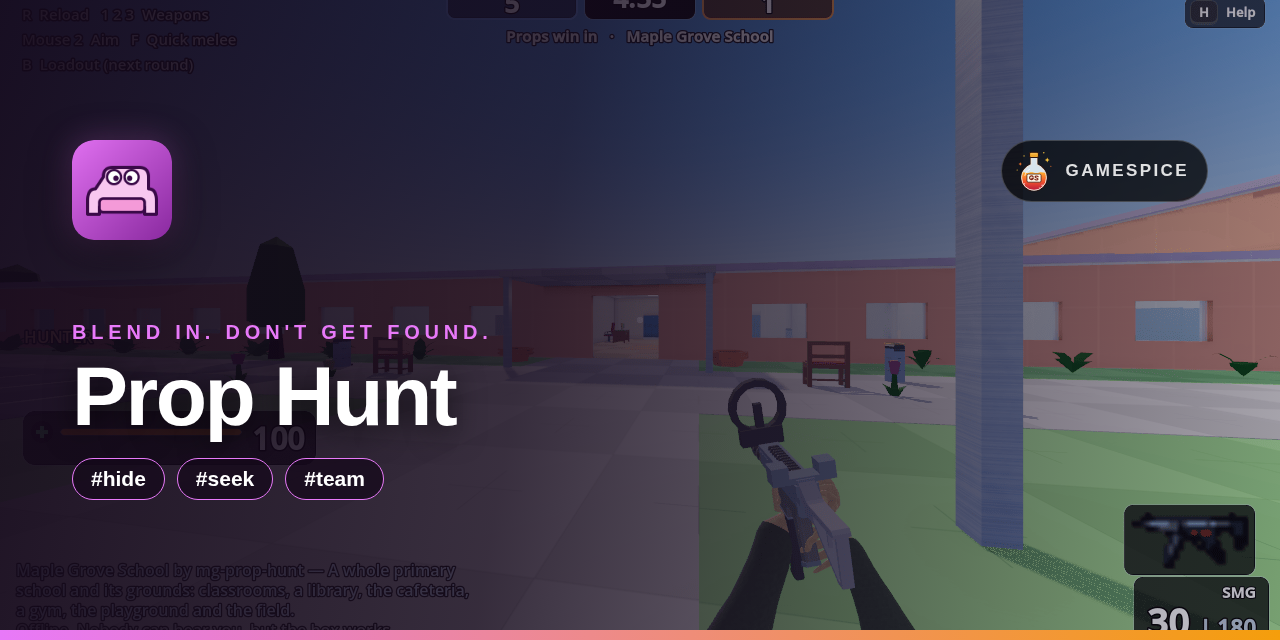
This is a game to demonstrate the capabilities of the GameSpice collection built on-top of Godot 4 and GameSpice. In this 3D game, most players are props: they hide by turning into a piece of furniture, a plant or a rock somewhere on the map and keeping still. The rest are hunters, who are blindfolded while the props hide and then have a few minutes to find them, with every wrong guess costing them health. This is inspired by the classic prop hunt game mode!
This project and the assets under it are COMPLETELY OPEN SOURCE. You are free to use, modify, and distribute them under the terms of the MIT license. The only thing not open source is the back-end web infrastructure. So if you opt into using your own authentication backend instead of integrating with GameSpice, you will need to build and integrate your own back-end infrastructure.
This game was built with Claude Code and has had little testing with real players, so please report anything odd you run into.
Screenshots
How it plays
Each round starts with the hide. By default the props get 30 seconds to run off and pick a spot while the hunters stand at their spawn with a black screen (they can still see their HUD and menus, just not the map or anybody on it). Then the hunters are let go and have 5 minutes. Both times are settings (see below), and a map may ask for less.
- Props look at something and press E to become it: a chair, a bin, a houseplant, a bookcase, a pumpkin. Bigger things have more health but are easier to spot, and you need room to become them: if you're too close to a wall you're moved a step away, and if there's no room at all (or no room to stand up when you show yourself) you're told so. Turn to fit in with the arrow keys, lock your rotation with C so looking around doesn't turn you, and stay still. Press Q to take the disguise off and show yourself as your avatar, which earns a point a second while you dare; it goes back on with Q again, and then you have to wait a little before you can do it again.
- Taunts. Once the hunters are let go, press T to play a sound from where you are standing (or F3 to pick one). Every taunt is worth points, but the hunters hear where it came from. Stand still for too long (60 seconds by default) and the game taunts for you, with a meter on screen showing how close it is.
- Hunters get an SMG, a shotgun and a hatchet. Shooting a prop hurts it. Shooting real furniture hurts you, so guess carefully. Run out of health and you blow apart.
- The beacon. When only one prop is left (by default; you can also set a time left), every prop still hiding pings out a sound and a ring everybody can see, every two seconds.
The props win if any of them is still hidden when the clock runs out, or if every hunter is gone. The hunters win if they find every prop. By default winning is worth 10 points to everyone on that side, finding a prop 5 and surviving a round 5 (all three are settings). Points, rounds won, props found and the rest go to your stats and the leaderboards on GameSpice.
A round draws the hunters fresh: one hunter for every 3 players by default, and at most 8. Say !hunter or !prop in chat to ask for a side. Anybody who is out watches the rest of the round. After a few rounds on a map, players vote for the next one (!rtv, !nominate ph_house).
The game has a small practice house built in. The separate mg-prop-hunt-maps pack adds over thirty more (schools, offices, hotels, a bank, a library and so on). A server holds 24 players by default (max_players in game.yml).
Controls
| Key | Action |
|---|---|
| WASD / mouse | Move and look |
| Space | Jump |
| Ctrl | Duck |
| E | Become what you are looking at (props) |
| Q | Show yourself / hide again (props) |
| C | Lock your rotation (props) |
| Arrow keys / Z | Tilt and lean / stand upright again (props) |
| T / F3 | Taunt / pick a taunt (props) |
| Mouse 1 / R / 1-3 | Fire / reload / weapons: melee, sidearm, primary (hunters) |
| 5 | Your grenade, if you took one on B (hunters) |
| Mouse 2 / F | Aim down the sights / quick melee (hunters) |
| B | Loadout: your primary, secondary and a grenade (slot 5, if you want one) as a hunter |
| V | Talk (voice) |
| L | Flashlight, either side (off on a lit map; on at start where the map is dark) |
| F5 | First or third person |
| G | While out: a free camera (WASD, Space / Ctrl up and down, Shift fast, Alt slow, mouse to look), and back onto a player |
| Tab | Scoreboard (hold) |
| H | Help: the goal, the rules and every key as you have it bound |
| Esc | Menu: settings (every key above can be rebound), help, and leave |
Getting started
You need Godot 4.7. The game is built from many GameSpice addons, each in its own repository, so the easiest way to get everything is gs-bootstrap. It clones every project and links the addons into each one:
git clone https://github.com/gamespice-platform/bootstrap.git
cd gs-bootstrap
./bootstrap.sh
cd projects/mg-prop-hunt
./game.sh
On Windows, run bootstrap.ps1 instead and open the project in Godot.
The maps come from the mg-prop-hunt-maps checkout, which bootstrap links into maps/ for you. On a deployed server they come from the server instead: the game ships only its built-in practice map, and the server owner picks the maps pack (gamemann/mg-prop-hunt-maps, or their own) in gs-server-deploy's cfg/content.yml.
game.sh does everything else:
| Command | What it does |
|---|---|
./game.sh |
Play offline against bots (they hide when you hunt, and hunt when you hide) |
./game.sh online |
Start a local server and the browser client, and print the link to open |
./game.sh online down |
Stop them |
./game.sh server |
Start a local dedicated server only |
./game.sh test |
Check every script and run every test suite |
./game.sh shot |
Save a screenshot to screenshots/. tools/shot.sh lists the views |
./game.sh help |
All of the options |
online and server use gs-server-deploy, which bootstrap clones next to this one. Run its ./setup.sh once first.
Running a server
Settings are cvars. Set them in the server's config, on the command line, or live from the console. Most of them take effect from the next round.
ph_hide_seconds 30             // how long the props have to hide (a map may ask for less)
ph_round_seconds 300           // how long the hunters have to find them (a map may ask for less)
ph_timeout_winner 1            // who wins when the clock runs out: 0 nobody, 1 props, 2 hunters
ph_players_per_hunter 3        // one hunter for every this many players (default 3, any value of 1 or more)
ph_min_hunters 1               // never fewer than this many (default 1, any value)
ph_max_hunters 8               // never more than this many (default 8, any value; 0 = no limit)
ph_hunter_pick 0               // 0 random, 1 a queue so everybody gets an equal share, 2 the sides swap
ph_side_choice 1               // 1 = !hunter and !prop count in the draw
ph_auto_taunt_seconds 60       // a prop standing still this long is taunted for (0 never)
ph_auto_taunt_radius 1.5       // metres a prop has to move for it to count as moving
ph_taunt_points 2              // points for a taunt a prop chose
ph_forced_taunt_points 0       // points for one the game forced
ph_reveal_cooldown 10          // seconds before a prop can show itself again
ph_reveal_points 1             // points a second while a prop shows itself
ph_beacon_props_left 1         // beacon every prop once this few are left (0 never)
ph_beacon_seconds_left 0       // beacon every prop with this many seconds left (0 never)
ph_decoy_penalty 0.2           // share of a shot's damage a hunter takes for hitting furniture (0 off)
ph_rounds_per_map 4            // rounds on a map before the next one
ph_spectate_camera 0           // who the dead may watch: 0 anybody, 1 their own side, 2 nobody (the same setting as mp_forcecamera)
mp_freeroam 1                  // the dead may fly a free camera; 0 keeps them on players
mp_freeroam_speed 12           // free camera speed, metres a second
mp_forcecamera 0               // 1 or 2 restricts the camera and switches free roam off
ph_autobhop 0                  // 1 = hold jump to keep hopping
mp_teammate_passthrough 1      // shots and team-mates: 0 a team-mate is hit and blocks, 1 through one at the muzzle, 2 through every team-mate
bot_quota 4                    // players a round is kept at with bots; each person who joins replaces one
bot_quota_mode fill            // fill (as above), fixed (that many bots), per_player (that many per person) or off
ph_bots 1                      // 0 = no bots
ph_bot_suspicion 12            // how often a bot hunter shoots something it suspects
bot_difficulty medium          // how bot hunters turn, aim and react: easy, medium, hard or nightmare
ph_vote_after 20               // seconds into a map's last round before the vote opens
A hunter who dies drops as a ragdoll (gs-player-char) and a prop that is found bursts into pieces; the server picks how each body goes down and everybody sees the same fall. sv_ragdoll 0 makes it a quick fall with no physics, sv_ragdoll_style picks ragdoll, stiff, topple or hide, sv_ragdoll_time and sv_ragdoll_max say how long and how many, and sv_ragdoll_reactions weights the falls (limp, face_plant, crumple, headshot_launch, power_launch; 0 turns one off). On a player's own machine, --ph-prop-death=1 topples a found prop instead of bursting it (2: it vanishes), and --ph-hunter-break says what the furniture does to a hunter it finishes (0 a ragdoll, 1 limbs, 2 bursts).
The bot cvars are the family's shared ones: how many is gs-server's GSBotQuota, how they turn, aim and react is gs-bot's bot_difficulty and its bot_* settings (bot_settings lists them; any one can be changed on its own). The same names work at the console in solo, and ./game.sh -- --bot_difficulty hard sets it at launch. ph_min_players still works and sets bot_quota; it is deprecated.
mp_teammate_passthrough is the family's shared one from gs-combat, live from the next shot. At 2 a team-mate in the line never stops a shot; splash still reaches them.
A map document has no size limit. A map larger than one message (60,000 bytes deflated) is sent in pieces, so a browser client gets it too. A server can still set limits with --ph-max-map-boxes, -props, -toys, -lights and -spawns (default 0, no limit, any value). A document over a limit is refused with its count, never cut down. --ph-map-lights-warn (default 128, any value, 0 for none) logs a warning past that many lights; the cost of a light stays the map author's choice.
--ph-map-ids=<ids> limits a server to some maps, and every other setting in game/ph_config.gd can be given the same way (--ph-taunt-range=80). The taunts are listed in taunts/taunts.json: edit it to add your own sounds. The vote's settings go in user://cfg/prophunt_vote.json ({"enabled": false} turns it off); gs-vote's README lists them.
Console commands:
| Command | |
|---|---|
ph_status |
The round, the map, and who is hiding as what |
ph_maps |
The maps the server has, and any it refused (with the reason) |
ph_map <id> |
Play this map next |
ph_taunts |
The taunts |
ph_reload |
Read the map folder again, for the next map |
ph_net |
What the network code is doing |
Admin commands
These come from gs-moderation: noclip, freeze, speed, gravity, god, buddha, hp, slay, slap, rename, the teleports, blind and beacon. respawn puts somebody back at their side's spawn. give and strip are turned off, because what a hunter carries is the server's loadout and a prop carries nothing.
Writing a map
A map is a JSON file: the building as boxes, the furniture as props, the lights, and where each side starts. The maps are in mg-prop-hunt-maps, whose tools/build_maps.py writes them (a wall with its doors and windows, or a furnished classroom, is one line there). maps/README.md in that repository describes the format. The server sends the map to each player when it changes, so players don't need the map files.
Testing
./game.sh test                      # every script parses, then every suite runs
./game.sh test headless_maps        # one suite
| Suite | What it covers |
|---|---|
headless_run |
The game itself: the draw, hiding, disguises, taunts, decoys, the beacon, bots |
headless_maps |
Every map: it encodes for the wire (no hard document limit), every spawn is clear, every prop stands on something |
headless_net |
A server and a client in one process, over the network code: disguises, the blindfold, taunts |
dedicated |
A real server: boots, loads the game, runs its commands, a round of bots, the map vote |
CLAUDE.md has the design decisions and the reasoning behind them.
The bots are simple: a bot prop walks to the nearest thing it can be and stays there, and a bot hunter wanders and shoots what moves. docs/not-yet.md lists what else is missing.
Credits
| Asset | Author / source | License | Where |
|---|---|---|---|
| Godot Engine logo (boot splash) | Andrea Calabró, godotengine.org | CC BY 4.0 | branding/splash.png |
| Furniture | Kenney, Furniture Kit | CC0 | each kit's licence |
| Food, bottles, kitchenware | Kenney, Food Kit | CC0 | each kit's licence |
| Crates, barrels, buckets, camp | Kenney, Survival Kit | CC0 | each kit's licence |
| Trees, plants, rocks | Kenney, Nature Kit; colours toned down at load | CC0 | each kit's licence |
| The two climbing trees | game-hide-n-seek, made in the Nature Kit's style (tools/climb_trees.py) |
CC0 | that repo |
| Most-used props (about seventy, e.g. chair, table, sofa, fridge, laptop, campfire logs) | Rebuilt from the Kenney models with their own palette, refitted to the stock bounds; art-src/build_props.py (Blender), stock models kept in art-src/base/ |
CC0 | art-src/ |
| Players | Quaternius, Zombie Apocalypse Kit, skinned from Kenney's Blocky Characters | CC0 1.0 | gs-player-char |
| Taunts | Kenney, Voiceover Pack and Music Jingles (kenney.nl) | CC0 | taunts/ |
| Weapons | zee-gs-weapons | see that repo | that repo |
| Weapon silhouettes, grenade burst | game-fatal-contact's renders and particles | see that repo | assets/weapon_icons/, scenes/fx/explosion.tscn |
| Floors, walls, roofs | Kenney, Prototype Textures under a pastel | CC0 | each kit's licence |
| Glass, boards, lockers, lines | Drawn in code | none | in code |
| Footsteps | Kenney, Impact Sounds | CC0 | addons/gs_audio/stock/CREDITS.md |
| Ambience beds | Generated by gs-audio | CC0 | addons/gs_audio/stock/CREDITS.md |
| Toys | gs-props, drawn in code; sounds by Kenney | CC0 | addons/gs_props/toys/sounds/CREDITS.md |
If you made one of these assets and want it removed, open an issue.
License
MIT. See LICENSE. The Kenney art is CC0, which is public domain.
Engagement Over Time
Zee's Prop Hunt is a Prop Hunt asset. It has 15 downloads, 31 views, and 0 favorites.
Reviews
Log in to leave a review.
Comments (0)
Log in to comment.