
A game under TMC's Dot's asset that acts as a sandbox and allows users to spawn props, fly around, and more.
This is a game to demonstrate the capabilities of the Dot collection built on-top of Godot 4 and TMC's gaming platform. In this 3D game, players are allowed to do whatever they want. It is intended to be a sandbox game. Players may hold the Q button in-game to bring up a menu to spawn props, NPCs, and weapons. You may also interact with props in the world using the physics and gravity guns. This is inspired by classic Sandbox games like Garry's Mod!
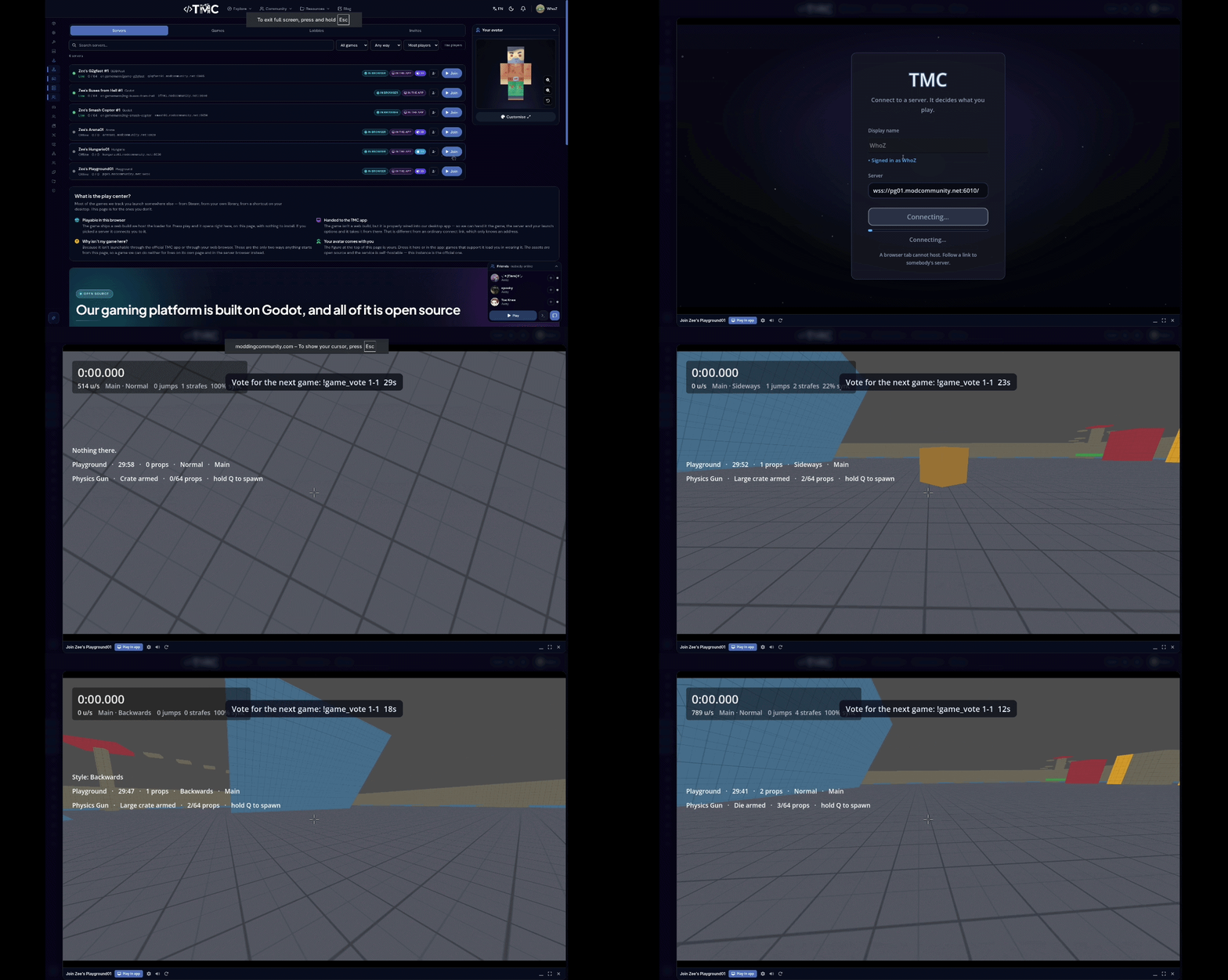
Play on my test server here!
This project and the assets under it are COMPLETELY OPEN SOURCE. You are free to use, modify, and distribute them under the terms of the MIT license. The only thing not open source is the back-end web infrastructure. So if you opt into using your own authentication backend instead of integrating with TMC, you will need to build and integrate your own back-end infrastructure.
From Maintainer & WARNING
This project, along with every asset it is built on, was built initially with Claude Code and will continue to be maintained and extended using it. This is because I (gamemann) cannot build the entire TMC platform alone (I wish I could lol).
Please treat this as partially tested. It has its own headless test suite and that suite passes, but very little of this has been in front of real players yet. Expect rough edges, and please report anything you run into.
I intend on reviewing code, testing, and editing documentation regularly. If you're interested in helping out, please let me know!
How it plays
Hold Q to open the spawn menu. Clicking something in it spawns it, and the menu stays open so you can keep building. There are four tabs, and / searches:
| Tab | |
|---|---|
| Props | Planks, panels, beams and pillars to build with; crates and barrels; balls from a beach ball to a boulder; and buttons, levers and doors |
| Entities | NPCs. One wanders, one chases you, one hops, one spins, a hunter, and soldiers and rebels that carry weapons. Soldiers fight players and rebels; rebels fight soldiers and follow you |
| Weapons | A launcher that fires props, a remover, an impulse gun, and the twenty-seven weapons of zee-dot-weapons. Right click a weapon in the menu to drop it on the ground |
| Tools | The tool gun: inflate, colour, remove, weld, no-collide, rope, balloon, physical properties, wire, giving an NPC a weapon, and editing a selected prop |
Some of what you can do:
- Pick props up with the physics gun and freeze them in place, or punt them with the gravity gun. You can pick other players up too (
pg_pickup). - Play with the map's toys. Every sandbox map has some: beach balls and footballs to kick (F) or shoot, a bowling lane, barrels and tyres, swings, see-saws, a roundabout that carries you round, trampolines and a bounce pad, lamps on a switch, a fountain, a horn and a bell.
sv_toys 0takes them away. - Ride props. Stand on a moving prop and it carries you.
- Edit a prop. Pick the tool gun's Edit properties mode and click a prop. It gets an outline, and the Tools tab shows its size, colour, freeze, gravity, weight, friction and bounce. Change any of them and the prop changes as you drag. Right click lets go; R puts it back as it was spawned.
- Wire things up. Use the tool gun's wire mode to connect a button or lever to a door, then press it with F.
- Save what you built with
pg_save <name>and load it again later withpg_load <name>. - Break things when the server has
pg_destruction 1: crates and planks break apart and barrels explode. - Creative mode. Type
!creativeand nobody can touch you or your props, and you can't hurt anybody. - Fight.
pg_arena 1turns on damage between players, andpg_wavessends waves of armed NPCs. The dead fall as ragdolls (dot-player-char), players and NPCs alike; the server picks how each goes down and everybody sees the same fall (sv_ragdoll 0for a quick fall with no physics,sv_ragdoll_reactionsto weight the falls).
There are four maps:
- pg_lobby is the sandbox: a 200-metre plate to build on. Its main track has no timer, so building is never timed. In one corner there is a jump course (bonus 1), a spiral tower (bonus 2) and a driving circuit round the plate (bonus 3). Press T to switch to one.
- pg_surf_intro is two surf ramps meeting in a valley, with a steep slide and a slalom of blocks as bonuses.
- pg_bhop_intro is bunny-hop blocks with widening gaps, plus six bonus courses.
- pg_generated is built from a seed each time it loads: rooms joined by corridors, with props scattered through them. Start with
--pg-map-seed=<n>to pick the seed, so you can share a layout.
Controls
| Key | Action |
|---|---|
| Q | Spawn menu. Hold it to browse; tap it to pin it open |
| Mouse 1 | Primary: grab with the physics gun, punt with the gravity gun, fire a weapon |
| Mouse 2 | Secondary: freeze what you are holding, or pull with the gravity gun; with a gun, aim down the sights |
| Mouse 3 | A gun's quick melee |
| Wheel | Move a held prop nearer or further |
| Shift + mouse | Turn a held prop |
| 1 / 2 / 3 | Physics gun / gravity gun / your weapons |
| E | Spawn the last prop again |
| F | Use: press a button, pull a lever, get in or out of a vehicle |
| R | Unfreeze everything you froze, or reload, or the tool gun's third action |
| Z | Undo your last spawn |
| WASD / Space / Ctrl | Move / jump (hold to keep hopping) / crouch |
| F5 | First or third person |
| T | Switch track (the sandbox or one of the courses) |
| Tab (hold) | Scoreboard: who is on, their score, time connected and ping |
| N | Change movement style |
| C / V | Save a checkpoint / go back to it |
| X / G | Pick a checkpoint / forget them all |
| Y / U | Chat / chat with nearby players |
| M | Next map |
| B | Loadout: the weapon you spawn with in the arena (a server's mode) |
| K | Push to talk |
| H | Help: what the game is and every key as you have it bound |
| Esc | Release the mouse; press again for the menu (settings, servers, help, leave). Every key above can be rebound under Controls |
Getting started
You need Godot 4.7. The game is built from many Dot addons, each in its own repository, so the easiest way to get everything is dot-bootstrap. It clones every project and links the addons into each one:
git clone https://github.com/modcommunity/dot-bootstrap.git
cd dot-bootstrap
./bootstrap.sh
cd projects/game-playground
./game.sh
On Windows, run bootstrap.ps1 instead and open the project in Godot.
game.sh does everything else:
| Command | What it does |
|---|---|
./game.sh |
Play offline, in a window |
./game.sh online |
Start a local server and the browser client, and print the link to open |
./game.sh online down |
Stop them |
./game.sh server |
Start a local dedicated server only |
./game.sh test |
Check every script and run every test suite |
./game.sh shot |
Save a screenshot to screenshots/ |
./game.sh help |
All of the options |
online and server use dot-server-deploy, which bootstrap clones next to this one. Run its ./setup.sh once first.
Running a server
Settings are cvars. Set them in the server's config, on the command line, or live from the console. cvarlist pg_ lists them all.
pg_map_seconds 1800          // how long a map runs before the vote (0 = forever)
pg_creative 1                // players may turn on creative mode
pg_prop_surf 1               // moving props carry the players standing on them
pg_destruction 0             // props can break, and barrels explode
pg_pickup 1                  // the physics gun can pick players up
pg_pickup_immune "admin"     // roles nobody may pick up
pg_pickup_override "root"    // roles that may pick anybody up
Limits
Each player has a limit for each kind of thing: pg_max_props, pg_max_npcs, pg_max_entities, pg_max_vehicles, pg_max_balloons, pg_max_weapons and pg_max_constraints (welds, ropes and no-collides). 0 is no limit. A role (an admin group, or admin / root) can get more:
pg_max_npcs 10
pg_limit_roles "admin: npcs=40 props=600; vip: props=300 balloons=60"
pg_limits u3                 // what player u3 is using against their limits
Console commands
| Command | |
|---|---|
pg_status |
What the server is doing |
pg_map <id>, pg_nextmap, pg_rtv |
Change the map, see what is next, rock the vote |
pg_arena [0|1] |
Damage between players on or off |
pg_waves |
Waves of armed NPCs |
pg_props_clear |
Remove every prop |
pg_save <name>, pg_load <name>, pg_builds, pg_build_delete <name> |
Saved builds |
pg_shop [0|1] |
Prices for spawning, paid from a bag |
pg_give <player> <prop> [count], pg_inv <player> |
Put things in a player's bag, or read it |
pg_zone, pg_zone_mark, pg_zone_save |
Draw timer zones (see below) |
Drawing timer zones
Any map can get a timed course. Stand in the map and draw the zones from the console:
pg_zone start          // the kind of zone to draw
pg_zone_mark           // stand on one corner
pg_zone_mark           // then the other
pg_zone_save           // write them to disk
Admin commands
These come from dot-moderation: !noclip, !freeze, !slay, !bring and the rest. blind <player> blacks out that player's screen, and beacon <player> puts a ring and a ping on them for everybody to see.
The map vote
The vote for the next map is dot-vote. The defaults are in game/playground_vote.gd. To change them, put a file at user://cfg/playground_vote.json (or use DOT_VOTE_* environment variables, or --vote-* arguments):
{ "end_vote": true, "vote_lead_sec": 120, "include_extend": true, "extend_seconds": 900, "max_extends": 4 }
end_vote: false turns the end-of-map vote off, and include_extend: false takes "extend" off the ballot. dot-vote's README lists every setting.
The bag and the shop
With pg_shop 1, spawning costs money. A player's bag is a 10 x 6 grid with a 400 kg limit: buying puts things in it, and spawning something you carry is free. There is no screen for the bag yet.
Testing
./game.sh test                         # every script parses, then every suite runs
./game.sh test headless_playground     # one suite
| Suite | What it covers |
|---|---|
headless_playground |
The whole game: props, NPCs, weapons, every tool, limits, the menu, the courses and map changes |
headless_net |
A server and a client in one process, over the network code |
headless_presentation |
What a client draws and plays |
headless_stack |
The whole stack of addons together |
dedicated |
A real server: boots, loads the game, runs its commands |
CLAUDE.md has the design decisions and the reasoning behind them.
Credits
The weapons are from zee-dot-weapons, which credits its own art. The block props and the menu icons are drawn from their definitions. The model props in assets/props/ are by Kenney (CC0 1.0): Furniture Kit, Food Kit, Survival Kit, Nature Kit and Mini Market (also by Fleur Keijsers and Guus Vermeulen); each folder's props.json carries its credit, and a model dropped into user://props/ appears in the Q menu with no code (docs/sandbox.md). People and NPCs are the family's animated people from Quaternius' Zombie Apocalypse Kit (CC0 1.0, credited in dot-player-char), coloured from Kenney's Blocky Characters skins (CC0) the site's avatar uses. The maps are drawn over Kenney's Prototype Textures (CC0), in assets/kenney/prototype/ with its licence. Footsteps are Kenney's Impact Sounds and the ambience beds are generated by dot-audio, both CC0 and shipped in dot-audio (addons/dot_audio/stock/CREDITS.md). The map's toys are dot-props', drawn from meshes made in code; their sounds are Kenney's (CC0) and a horn made for dot-props, credited in addons/dot_props/toys/sounds/CREDITS.md.
License
MIT. See LICENSE.
時系列のエンゲージメント
Game - Playground はPlayground 向けアセットです。1 回のダウンロード、18 回の閲覧、0 件のお気に入り があります。
コメント (0)
コメントするにはログインしてください。